



Turning a status board into an action tool for 140+ logistic hub leaders

Turning a status board into an action tool for 140+ logistic hub leaders

My role

Sole designer

Team

PM, product director, process team, operation team, site leaders, engineering

Platform

Web

Timeline

3 weeks

Responsibilities

Scope definition

Design direction

Research

Interaction design

Visual design

Prototyping

OVERVIEW

OVERVIEW

Five tools. One broken field operation workflow

Carvana operates 140+ market hubs where vehicles are received, prepped, and handed off to customers. Site leaders manage hub operations through MOMS, an internal platform that tracks scheduling, labor, and daily activity execution.


The problem was that leaders had no way to investigate or resolve at-risk activities from inside MOMS. Every step required jumping between five disconnected tools. Hubs were ending each day with an average of 35 unclosed at-risk activities.


I was the sole designer on this project, owning everything from research to final specs. The solution was a side panel built into Activity Execution that gives leaders everything they need to investigate and act without leaving MOMS.

ROLE AND CHALLENGES

ROLE AND CHALLENGES

I connected different pieces of the project

  • Bridged 2 engineering teams to build the AI summary feature

  • Added a new pattern to the local logistics design library

  • Designed across 3 interconnected systems: MOMS, Cruise Control and CARMA

IMPACT

The rollout is live and showing early promise

We rolled out the new designs to three hubs over six weeks before expanding to the full network. The results came back strong.

30 21 mins

30 21 mins

Avg time to resolve an at-risk activity

Avg time to resolve an at-risk activity

35 7 activities

35 7 activities

Avg open at-risk activities at end of day

Avg open at-risk activities at end of day

5 2 tools

5 2 tools

Tools used for resolution

Tools used for resolution

Final solution

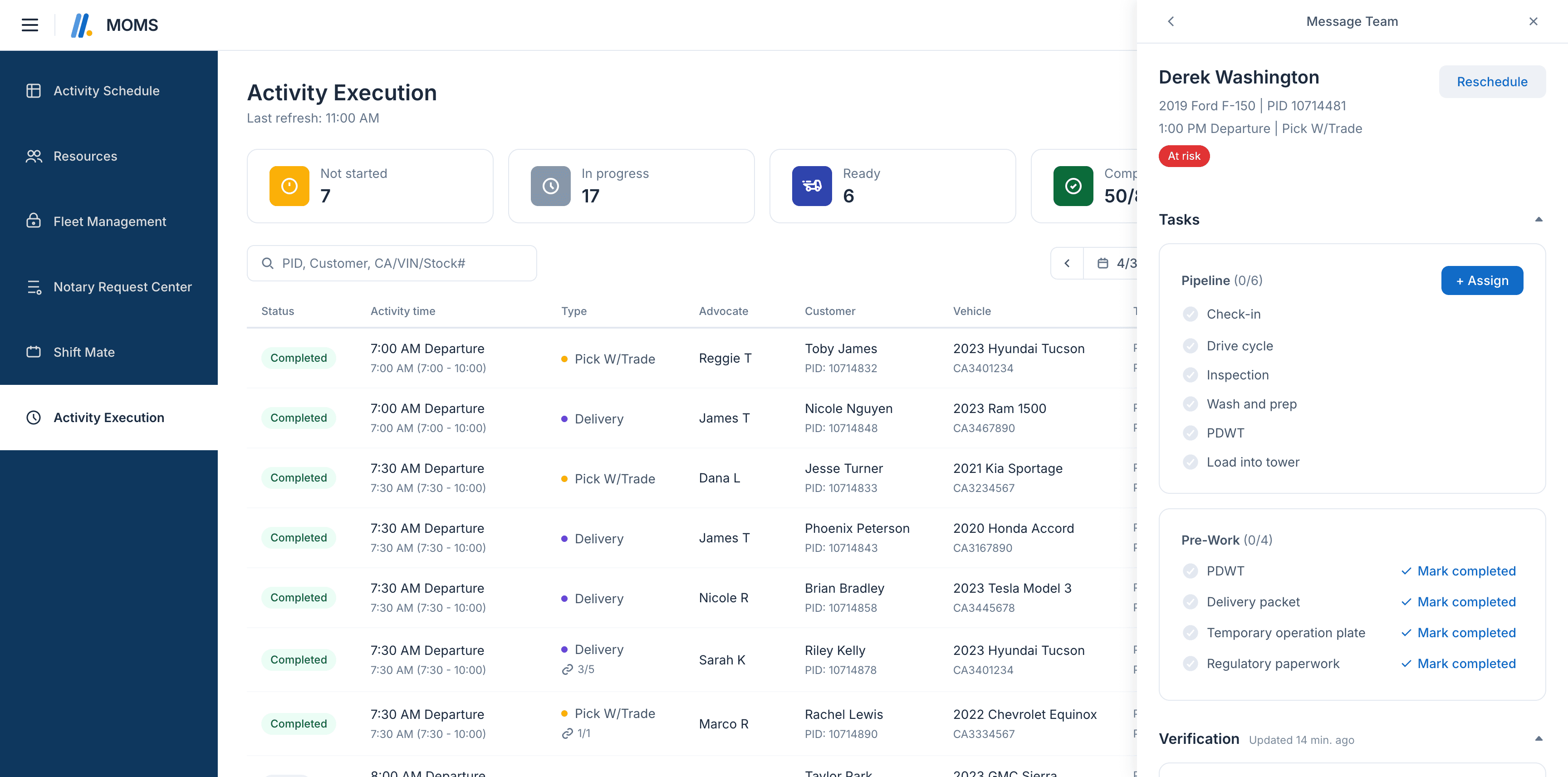
The Activity Execution page showed leaders what was at risk but it didn't allow them to act on it. With the new side panel, leaders have everything they need to investigate and resolve an activity without leaving MOMS.


Leaders can assign advocates to work on tasks directly from the panel and the assignment flows through to Cruise Control automatically. Verification history is summarized by AI so leaders know what the team has already done before they act. For the first time, all three workflows are visible and actionable from a single surface.
MY DESIGN PROCESS

PROBLEM

PROBLEM

35 unclosed at-risk activities per hub per day was the number that started everything

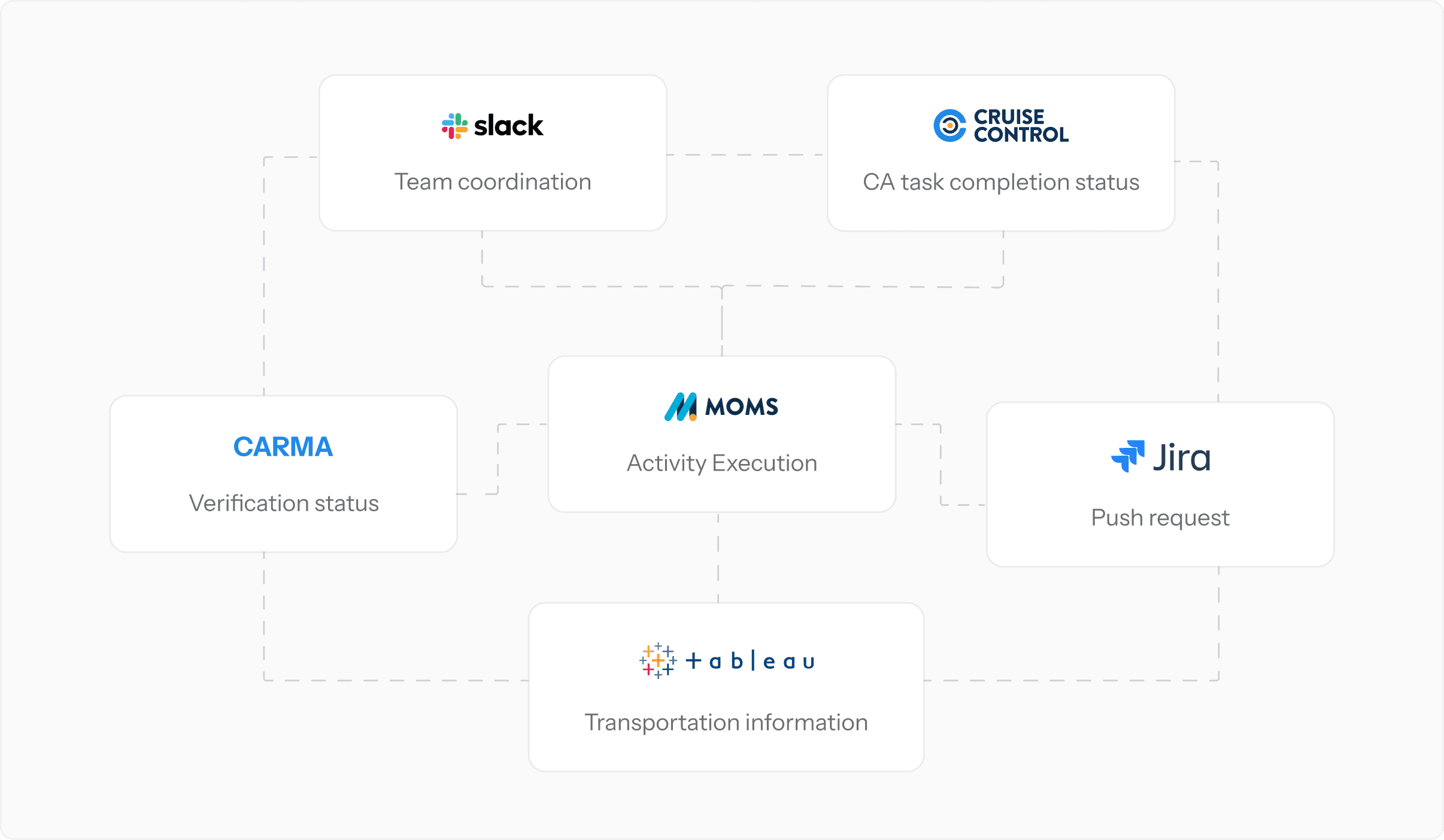
Site leaders were managing their day across five tools: MOMS, Cruise Control, CARMA, Tableau, and Jira. All open at the same time, every shift. A survey across all 140+ hubs found that 51% of leaders flagged multi-platform navigation as a major frustration.


The impact was real. Hubs ended each day with an average of 35 unclosed at-risk activities. Delayed appointments. Real customers waiting longer than they should.

DISCOVERY

DISCOVERY

Who actually uses this tool and what they needed from it

To design the right solution, I needed to understand the tool itself and the users operating out of the hubs.


Site leaders are the primary users of MOMS. Their job is to spot problems early and get the right person on it fast and not to do the work themselves unless they really had to. Customer Advocates (CA) and Lot Attendants (LA) carry out the day-to-day tasks and work out of Cruise Control app.

SL

SL

Site leaders

Site leaders

Oversee schedules and staffing

Oversee schedules and staffing

Monitor at-risk activities

Monitor at-risk activities

Coordinate resolution across teams

Coordinate resolution across teams

CA

CA

Customer Advocates (CA)

Customer Advocates (CA)

Execute deliveries and pick-ups

Execute deliveries and pick-ups

Interact with customers

Interact with customers

Complete pre-work tasks and paperwork

Complete pre-work tasks and paperwork

LA

LA

Lot Attendants (LA)

Lot Attendants (LA)

Check in vehicles

Check in vehicles

Clean and prep vehicles

Clean and prep vehicles

Complete pipeline tasks

Complete pipeline tasks

DISCOVERY

DISCOVERY

Trying out the tool and testing the workflow myself

Before I shaped any interview questions, I walked through the existing Activity Execution page the way a leader would at the start of a shift. The core problem was immediate. The page only showed that something was wrong but it gave leaders no way to figure out why or what to do next.

Tolleson IC

CP

Missing contracts
No green status
Offsite

Activity Schedule

Resources

Fleet Management

Notary Request Center

Shift Mate

Activity Execution

Activity Execution

Last refresh:

11:00 AM

Completed

3/6

Ready for delivery

2

In progress

2

Not started

2

Action required

6

PID, Customer, CA/VIN/Stock#

Today

Sort: Activity time

Filter

Status

Activity time

Type

Advocate

Customer

Vehicle

Task Status

Alert

Needs attention

Completed

11:00 AM Departure

12:15 AM (11:00 -2:00)

STC

Marco R

Jason Lee

PID: 10714478

2023 Ram 1500

CA3245679

Pipeline(7/7)

Pre-work(4/4)

In progress

11:00 AM Departure

12:15 AM (11:00 -2:00)

Pick W/Trade

Marco R

Stephanie Frederick

PID: 10714478

2022 Toyota Highlander

CA3245679

Pipeline(3/7)

Pre-work(3/4)

At risk

Same day

Missing PDWT

+3 More

View Details

Not started

11:00 AM Departure

12:15 AM (11:00 -2:00)

Delivery

Marco R

Jeremy Daniels

PID: 10714478

2022 Nissan Rogue

CA3245679

Pipeline (0/7)

Pre-work (0/4)

Missing contracts
No green status
Offsite

Ready

11:00 AM Departure

12:15 AM (11:00 -2:00)

STC

Marco R

Rosa Nelson

PID: 10714478

2021 Kia Sportage

CA3245679

Pipeline(7/7)

Pre-work(4/4)

In progress

11:00 AM Departure

12:15 AM (11:00 -2:00)

Pick W/Trade

Marco R

Jason Anderson

PID: 10714478

2021 Volkswagen

CA3245679

Pipeline(7/7)

Pre-work (3/4)

At risk

Missing PDWT

Missing check-in

Not started

11:00 AM Departure

12:15 AM (11:00 -2:00)

Delivery

Marco R

Finley Bell

PID: 10714478

2022 Nissan Rogue

CA3245679

Pipeline (0/7)

Pre-work (0/4)

Completed

11:00 AM Departure

12:15 AM (11:00 -2:00)

STC

Marco R

Kendall Roberts

PID: 10714478

2021 Dodge C...

CA3245679

Pipeline (7/7)

Pre-work (4/4)

“Status” and “Alert” columns are basically conveying the same thing but are separated.

“Task status” and “Needs attention” columns are basically conveying the same thing but are separated.

Only shows you that there are issues but no way to resolve them

09/23/13 9:00 AM

Delivery

Pipeline (3/7)

Title

Status

Advocate

Last Update

Check-in

Completed

Casey J.

9/12/24 9:00 am

Drive cycle

Completed

Casey J.

9/12/24 9:00 am

Inspection

Completed

Casey J.

9/12/24 9:00 am

Wash and prep

Completed

Casey J.

9/12/24 9:00 am

PDWT

Completed

Casey J.

9/12/24 9:00 am

Load into tower

In Progress

Casey J.

9/12/24 9:00 am

Pre-work (1/4)

Title

Status

Advocate

Last Update

PDWT

Completed

Nicholas M.

9/12/24 9:00 am

Delivery packet

Completed

Nicholas M.

9/12/24 9:00 am

Temporary operation plate

Completed

Nicholas M.

9/12/24 9:00 am

Regulatory paperwork

Not Started

--

--

Tolleson IC

CP

Missing contracts
No green status
Offsite

Activity Schedule

Resources

Fleet Management

Notary Request Center

Shift Mate

Activity Execution

Activity Execution

Last refresh:

11:00 AM

Completed

3/6

Ready for delivery

2

In progress

2

Not started

2

Action required

6

PID, Customer, CA/VIN/Stock#

Today

Sort: Activity time

Filter

Status

Activity time

Type

Advocate

Customer

Vehicle

Task Status

Alert

Needs attention

Completed

11:00 AM Departure

12:15 AM (11:00 -2:00)

STC

Marco R

Jason Lee

PID: 10714478

2023 Ram 1500

CA3245679

Pipeline(7/7)

Pre-work(4/4)

In progress

11:00 AM Departure

12:15 AM (11:00 -2:00)

Pick W/Trade

Marco R

Stephanie Frederick

PID: 10714478

2022 Toyota Highlander

CA3245679

Pipeline(3/7)

Pre-work(3/4)

At risk

Same day

Missing PDWT

+3 More

View Details

Not started

11:00 AM Departure

12:15 AM (11:00 -2:00)

Delivery

Marco R

Jeremy Daniels

PID: 10714478

2022 Nissan Rogue

CA3245679

Pipeline (0/7)

Pre-work (0/4)

Missing contracts
No green status
Offsite

Ready

11:00 AM Departure

12:15 AM (11:00 -2:00)

STC

Marco R

Rosa Nelson

PID: 10714478

2021 Kia Sportage

CA3245679

Pipeline(7/7)

Pre-work(4/4)

In progress

11:00 AM Departure

12:15 AM (11:00 -2:00)

Pick W/Trade

Marco R

Jason Anderson

PID: 10714478

2021 Volkswagen

CA3245679

Pipeline(7/7)

Pre-work (3/4)

At risk

Missing PDWT

Missing check-in

Not started

11:00 AM Departure

12:15 AM (11:00 -2:00)

Delivery

Marco R

Finley Bell

PID: 10714478

2022 Nissan Rogue

CA3245679

Pipeline (0/7)

Pre-work (0/4)

Completed

11:00 AM Departure

12:15 AM (11:00 -2:00)

STC

Marco R

Kendall Roberts

PID: 10714478

2021 Dodge C...

CA3245679

Pipeline (7/7)

Pre-work (4/4)

Tolleson IC

CP

Missing contracts
No green status
Offsite

Activity Schedule

Resources

Fleet Management

Notary Request Center

Shift Mate

Activity Execution

Activity Execution

Last refresh:

11:00 AM

Completed

3/6

Ready for delivery

2

In progress

2

Not started

2

Action required

6

PID, Customer, CA/VIN/Stock#

Today

Sort: Activity time

Filter

Status

Activity time

Type

Advocate

Customer

Vehicle

Task Status

Alert

Needs attention

Completed

11:00 AM Departure

12:15 AM (11:00 -2:00)

STC

Marco R

Jason Lee

PID: 10714478

2023 Ram 1500

CA3245679

Pipeline(7/7)

Pre-work(4/4)

In progress

11:00 AM Departure

12:15 AM (11:00 -2:00)

Pick W/Trade

Marco R

Stephanie Frederick

PID: 10714478

2022 Toyota Highlander

CA3245679

Pipeline(3/7)

Pre-work(3/4)

At risk

Same day

Missing PDWT

+3 More

View Details

Not started

11:00 AM Departure

12:15 AM (11:00 -2:00)

Delivery

Marco R

Jeremy Daniels

PID: 10714478

2022 Nissan Rogue

CA3245679

Pipeline (0/7)

Pre-work (0/4)

Missing contracts
No green status
Offsite

Ready

11:00 AM Departure

12:15 AM (11:00 -2:00)

STC

Marco R

Rosa Nelson

PID: 10714478

2021 Kia Sportage

CA3245679

Pipeline(7/7)

Pre-work(4/4)

In progress

11:00 AM Departure

12:15 AM (11:00 -2:00)

Pick W/Trade

Marco R

Jason Anderson

PID: 10714478

2021 Volkswagen

CA3245679

Pipeline(7/7)

Pre-work (3/4)

At risk

Missing PDWT

Missing check-in

Not started

11:00 AM Departure

12:15 AM (11:00 -2:00)

Delivery

Marco R

Finley Bell

PID: 10714478

2022 Nissan Rogue

CA3245679

Pipeline (0/7)

Pre-work (0/4)

Completed

11:00 AM Departure

12:15 AM (11:00 -2:00)

STC

Marco R

Kendall Roberts

PID: 10714478

2021 Dodge C...

CA3245679

Pipeline (7/7)

Pre-work (4/4)

“Status” and “Alert” columns are basically conveying the same thing but are separated.

“Status” and “Alert” columns are basically conveying the same thing but are separated.

“Task status” and “Needs attention” columns are basically conveying the same thing but are separated.

“Task status” and “Needs attention” columns are basically conveying the same thing but are separated.

Only shows you that there are issues but no way to resolve them

Only shows you that there are issues but no way to resolve them

09/23/13 9:00 AM

Delivery

Pipeline (3/7)

Title

Status

Advocate

Last Update

Check-in

Completed

Casey J.

9/12/24 9:00 am

Drive cycle

Completed

Casey J.

9/12/24 9:00 am

Inspection

Completed

Casey J.

9/12/24 9:00 am

Wash and prep

Completed

Casey J.

9/12/24 9:00 am

PDWT

Completed

Casey J.

9/12/24 9:00 am

Load into tower

In Progress

Casey J.

9/12/24 9:00 am

Pre-work (1/4)

Title

Status

Advocate

Last Update

PDWT

Completed

Nicholas M.

9/12/24 9:00 am

Delivery packet

Completed

Nicholas M.

9/12/24 9:00 am

Temporary operation plate

Completed

Nicholas M.

9/12/24 9:00 am

Regulatory paperwork

Not Started

--

--

DISCOVERY

DISCOVERY

Saw leaders managing the day using 5 disconnected tools

After auditing the tool, I ran shadowing sessions with three site leaders at the Montebello hub to see the actual workflow: what they looked for, in what order, and how long each step took.


What I watched was a leader using 4-5 tools at once that never talked to each other. He'd open MOMS to find flagged activities, flip to Cruise Control to check if the CA had contacted the customer, open Carma to check verification status, then open Jira to file a push request if the vehicle had issues. Then back to MOMS, which had no idea any of that happened.


Every switch cost time. And because the tool couldn't surface what he needed or let him act on anything, the whole operation ran on him holding it all in his head.
DISCOVERY

DISCOVERY

Interviews surfaced two problems the brief had not mentioned

After interviewing leaders, CAs, and LAs, two things came up that the brief hadn't flagged.


Every update required another touchpoint

Staying on top of verification status ate up a lot of the leaders’ time. When a customer had incomplete tasks, leaders had no way to see if the verification team was actively working on it. They had to reach out manually and follow up again if nothing came back.

After interviewing leaders, CAs, and LAs, two things came up that the brief hadn't flagged.

Every update required another touchpoint

Staying on top of verification status ate up a lot of the leaders’ time. When a customer had incomplete tasks, leaders had no way to see if the verification team was actively working on it. They had to reach out manually and follow up again if nothing came back.

Step 1

Sees that customer is not verified and therefore appointment can’t be completed

Step 2

Reaches out to Verification team on Slack to inquire about status

Step 3

Pending on response since Verification team has to reach out to customer

Step 4

Verification team responds after a while with an update

Step 5

Waiting for customer to complete their verification tasks

Loop ends only after customer completes all their tasks

VERIFICATION UPDATES

Handoffs were entirely manual

LAs found out about urgent task changes through a tap on the shoulder. If a CA ran late and missed pre-work, a leader would step in to cover but because none of it happened in the tool, the CA had no idea what had been done on their behalf unless the leaders tell them directly.

9:02 AM

CA calls leader: running 30 min late

Phone call

9:05 AM

Leader covers pre-work tasks for the next appointment*

Not logged anywhere

9:18 AM

Leader completes verification check on the CA’s behalf*

Not logged anywhere

9:32 AM

CA arrives at the hub and finds leader to get update

In person

*2 tasks happened on the CA’s behalf but none of them were reflected in MOMS.

*2 tasks happened on the CA’s behalf but none of them were reflected in MOMS.

MANUAL HANDOFF

DISCOVERY

DISCOVERY

Borrowing from other tools that had solved the problem

I looked at tools in adjacent industries that had already solved a version of the same problem: field operations where managers need live context and the ability to act from one place. Three products shaped how I thought about the design.


Side panel with context and actions together

Side panel with context and actions together

Opening a work order surfaces full context alongside action options in one place.

Opening a work order surfaces full context alongside action options in one place.

One action updates multiple systems

One action updates multiple systems

A rescheduled appointment in MOMS will update TMS, notify the CA, and alert the customer.

A rescheduled appointment in MOMS will update TMS, notify the CA, and alert the customer.

Field execution and dispatch in one place

Field execution and dispatch in one place

Real-time status, actionable from the same screen. Model for surfacing Cruise Control task data inside MOMS instead of a separate tab.

Real-time status, actionable from the same screen. Model for surfacing Cruise Control task data inside MOMS instead of a separate tab.

DEFINE

DEFINE

Synthesized the findings with my product owners to arrive at 5 themes

I brought the PM and product director into a synthesis session to make sense of the research findings. We clustered the raw notes together and landed on five themes. Two became the focus of this project. The remaining three (urgency signal failure, same-day awareness gap, and false at-risk signals) were valid problems but we kept them out of scope. The goal was to ship a focused solution and learn from it first.

In Scope

In Scope

Tool fragmentation

Tool fragmentation

Leaders jumped between five tools to manage a single hub day

Leaders jumped between five tools to manage a single hub day

In Scope

In Scope

Manual handoff burden

Manual handoff burden

Even when a leader knew what they needed to do, they couldn’t perform the actions in MOMS

Even when a leader knew what they needed to do, they couldn’t perform the actions in MOMS

Out of Scope

Out of Scope

Urgency signal failure

Urgency signal failure

At-risk activities all had the same level of urgency

At-risk activities all had the same level of urgency

Out of Scope

Out of Scope

Same-day awareness gap

Same-day awareness gap

Leaders lacked a real-time view of how the full day was tracking

Leaders lacked a real-time view of how the full day was tracking

Out of Scope

Out of Scope

False at-risk signals

False at-risk signals

Activities flagged as at-risk even when no action was needed


Activities flagged as at-risk even when no action was needed


DEFINE

DEFINE

Mapping the triage workflow to pinpoint the areas of friction

To understand where the workflow was breaking down, I reconstructed the full triage workflow a site leader goes through during their shift.

Leaders started on the Activity Execution page but were already switching tools by step three. Investigating incomplete pre-work tasks required jumping to Cruise Control to see if the CA was mid-appointment and running late. Checking customer verification meant opening CARMA, then messaging the verification team to get more information. Rescheduling involved manually pulling data and writing Jira tickets.

By the time a leader closed a single at-risk activity, they had touched four tools and carried information between them by hand at every step.

Finds at-risk activity

Investigate

Coordinate

Escalate

Close

Leader actions

Reviews at-risk list on Activity Execution page

Reviews at-risk list on Activity Execution page

Checks tasks, verification, and repair statuses

Checks tasks, verification, and repair statuses

Coordinates with relevant advocates at the hub

Coordinates with relevant advocates at the hub

Messages team or requests to reschedule appointment

Messages team or requests to reschedule appointment

Returns to MOMS to manage the next at-risk activity

Returns to MOMS to manage the next at-risk activity

Tools used

CARMA

CARMA

Pain points

Not enough context on why activity is at risk

Not enough context on why activity is at risk

Context switch required to every tool

Context switch required to every tool

No way to act from MOMS

No way to act from MOMS

Manual outreach. No record in tool

Manual outreach. No record in tool

Resolution invisible to team

Resolution invisible to team

LINE OF VISIBILITY

LINE OF VISIBILITY

CA actions

Running appointment. Unaware of at-risk activities

Running appointment. Unaware of at-risk activities

May be mid-appointment or running late

May be mid-appointment or running late

Talks in person or via phone call

Talks in person or via phone call

Sees that their appointment has been rescheduled

Sees that their appointment has been rescheduled

Works on the next appointment

Works on the next appointment

LA actions

Running pipeline tasks. Unaware of at-risk activities

Running pipeline tasks. Unaware of at-risk activities

No update unless leaders go to look for them

No update unless leaders go to look for them

Talks in person

Talks in person

Sees that the pipeline tasks for the activity have been canceled

Sees that the pipeline tasks for the activity have been canceled

Works on the next set of tasks

Works on the next set of tasks

DEFINE

DEFINE

The decision tree for rescheduling at-risk activities

Rescheduling an at-risk activity requires leaders to quickly assess task progress, customer verification status, and vehicle repair status against the departure window. If any cannot finish on time, they reschedule the appointment.

The planning system should auto-flag issues, but it often lacks real-time visibility into active verification calls or sudden repair delays. As the final decision-makers, leaders need all three statuses in one place to decide fast and accurately.

Reschedule activity

Reschedule activity

Tasks completed

Tasks completed

Customer completed verification tasks?

Customer completed verification tasks?

Has verification team contacted customer?

Has verification team contacted customer?

Will it arrive in time before departure/pick-up time?

Will it arrive in time before departure/pick-up time?

Will it arrive in time to complete pipeline and pre-work tasks?

Will it arrive in time to complete pipeline and pre-work tasks?

Can customer verify in time before appointment?

Can customer verify in time before appointment?

Tasks incomplete?

Tasks incomplete?

Vehicle in repair?

Vehicle in repair?

Can LA complete the tasks on time?

Can LA complete the tasks on time?

Yes

Yes

Can CA complete the tasks on time?

Can CA complete the tasks on time?

Can leaders complete tasks on CA’s behalf?

Can leaders complete tasks on CA’s behalf?

Yes

Yes

Yes

Yes

No

No

No

No

No

No

Yes

Yes

Yes

Yes

No

No

Yes

Yes

Yes

Yes

Yes

Yes

No

No

Yes

Yes

Yes

Yes

No

No

Customer verified

Customer verified

Vehicle ready to go

Vehicle ready to go

No

No

No

No

Activity flagged as at-risk

Activity flagged as at-risk

DEFINE

DEFINE

Four principles to guide the design

To keep design focused on the problems and make sure the solutions are actually speeding up users workflows and not slowing them down. I came up with 4 design principles to use as my north star.


1

Surface the right information at the moment of action

1

Surface the right information at the moment of action

2

System does the work. Leader makes the call

2

System does the work. Leader makes the call

3

Every action that crosses a system needs a status

3

Every action that crosses a system needs a status

4

Reducing noise is as important as increasing signal

4

Reducing noise is as important as increasing signal

DEFINE

DEFINE

The constraints that made this harder than it looked

Throughout the design process, I came across many constraints related to design, data, and workflows. I worked closely with the PM, engineering, and cross-functional stakeholders to understand what was technically possible and adjusted the design to work within those limits.


The goal was to find solutions that were still meaningful to leaders even when the data or system access wasn't perfect.

Design system gaps

Design system gaps

Constraint

Constraint

The Carvana Design System offered simple components that didn't meet the complexity needs of internal tools like MOMS

The Carvana Design System offered simple components that didn't meet the complexity needs of internal tools like MOMS

Solution

Solution

I built new patterns on top of the existing foundation without breaking it, then added them to the local pattern library

I built new patterns on top of the existing foundation without breaking it, then added them to the local pattern library

Data dependencies

Data dependencies

Constraint

Constraint

Verification updates depend on real-time data from the upstream CARMA system which is not always reliable

Verification updates depend on real-time data from the upstream CARMA system which is not always reliable

Solution

Solution

The design had to account for missing or delayed data without breaking the leader's workflow or hiding the gap

The design had to account for missing or delayed data without breaking the leader's workflow or hiding the gap

Reschedule complexity

Reschedule complexity

Constraint

Constraint

Rescheduling touches Transportation Management System, the customer notification system, and the CA's schedule

Rescheduling touches Transportation Management System, the customer notification system, and the CA's schedule

Solution

Solution

I mapped how data flows in and out of each related system so the experience felt cohesive, even across surfaces I didn't own

I mapped how data flows in and out of each related system so the experience felt cohesive, even across surfaces I didn't own

Siloed repair status

Siloed repair status

Constraint

Constraint

Repair status is owned by a separate team that doesn't share detailed data with the logistics side

Repair status is owned by a separate team that doesn't share detailed data with the logistics side

Solution

Solution

I used what was available (repair type, reconditioning center location, and planned trip schedule) to calculate an estimated status

I used what was available (repair type, reconditioning center location, and planned trip schedule) to calculate an estimated status

IDEATION

IDEATION

Activity Details: The right place to show all the details

The challenge was figuring out how to show activity details without pulling leaders away from the board. With multiple at-risk activities, they needed to investigate each one and act fast. The layout had to support both scanning and resolution at the same time. I tested four directions before landing on the side panel, which was the only approach that cleanly separated the two jobs: the table handles scanning, the panel handles investigation and action.

Ruled Out

Ruled Out

Modal

  • Blocks the entire table.

  • The moment a leader opens one activity, they lose sight of everything else on the board.

Ruled Out

Ruled Out

Inline expanded rows

  • Kept the table visible but became unmanageable with six or more flagged activities.

  • Not enough room to show the detail leaders needed.

Ruled Out

Ruled Out

New status columns on table

  • Added noise to every row, not just flagged ones.

  • On-time activities carried columns they had no use for, making the whole table harder to read.

Winner

Winner

Side panel

  • Split the jobs correctly. The table handles scanning and prioritization.

  • The panel handles investigation and action.

  • Neither competes with the other.

IDEATION

IDEATION

Side Panel: What information to show and how to show it

The challenge was figuring out how to show activity details without pulling leaders away from the board. With multiple at-risk activities, they needed to investigate each one and act fast. The layout had to support both scanning and resolution at the same time. I tested four directions before landing on the side panel, which was the only approach that cleanly separated the two jobs: the table handles scanning, the panel handles investigation and action.

Version 1

Actions were immediate, but leaders said the most important information was hidden behind clicks.

Version 2

Version 3

Version 4

Version 5

Winner

SIDE PANEL

Version 1

Actions were immediate, but leaders said the most important information was hidden behind clicks.

Version 2

Version 3

Version 4

Version 5

Winner

SIDE PANEL

IDEATION

IDEATION

Tasks: Giving leaders control over tasks

The tasks section was the most important to get right. It's the one section every activity has, and where leaders have the most direct control.

Pipeline tasks belong to LAs. Pre-work tasks belong to the assigned CA. Because they have different owners and different resolutions, I needed to make that separation obvious at a glance.


The other decision was how leaders mark pre-work tasks complete on behalf of a CA. Because the action triggers an update in Cruise Control, the action should be irreversible.

TASKS MODULE

Tasks

Assign

Check-in

Tanya W.

Drive cycle

Tanya W.

Inspection

(Assigned)

Wash and prep

(Assigned)

PDWT

(Assigned)

Temporary operation plate

Mark completed

Regulatory paperwork

Mark completed

PDWT

Mark completed

Delivery packet

Mark completed

Flat list

Pipeline and pre-work tasks were mixed together. Ownership was impossible to read at a glance.

Tabs

Grouped cards

Winner

TASKS MODULE

Tasks

Assign

Check-in

Tanya W.

Drive cycle

Tanya W.

Inspection

(Assigned)

Wash and prep

(Assigned)

PDWT

(Assigned)

Temporary operation plate

Mark completed

Regulatory paperwork

Mark completed

PDWT

Mark completed

Delivery packet

Mark completed

Flat list

Pipeline and pre-work tasks were mixed together. Ownership was impossible to read at a glance.

Tabs

Grouped cards

Winner

Pre-Work (2/4)

Damon E.

Temporary operation plate

Mark completed

Regulatory paperwork

Mark completed

PDWT

Delivery packet

Checkbox

Checkbox implies the action can be undone. Pre-work completion in Cruise Control is irreversible.

Toggle

Button with complete state

Winner

PRE-WORK TASKS

Pre-Work (2/4)

Damon E.

Temporary operation plate

Mark completed

Regulatory paperwork

Mark completed

PDWT

Delivery packet

Checkbox

Checkbox implies the action can be undone. Pre-work completion in Cruise Control is irreversible.

Toggle

Button with complete state

Winner

PRE-WORK TASKS

Final designs

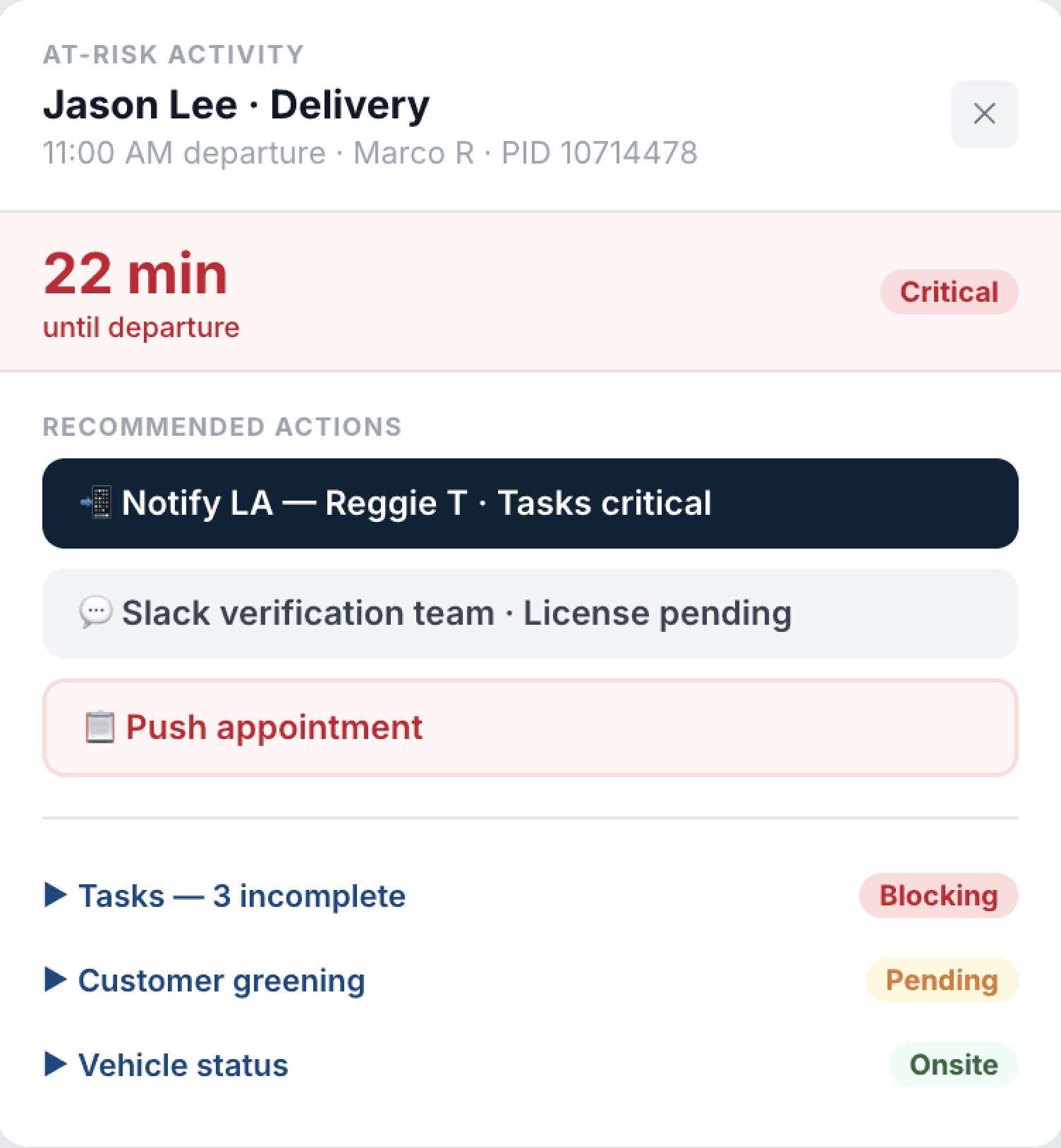
A side panel that brings the information and actions leaders need to resolve at-risk activities into one place.

SIDE PANEL

Built around how leaders investigate and act

The side panel is organized into three sections in the order a leader would naturally work through them. Tasks appear on every activity. Verification and Repair appear only when needed.
Highlight

During the exploration phase, I ran multiple review sessions with leaders, the operations team, and the PM throughout the design process to make sure the direction stayed feasible and actually solved what they needed.

TASKS

Direct control over task assignment and progress

Leaders can see task assignments and progress, route unassigned tasks to an available LA, or complete pre-work on a late CA's behalf.

Highlight

Engineering flagged real-time saves as too heavy a lift, but I pushed for a lightweight solution since leaders couldn't afford an extra click per save.

VERIFICATION

Verification notes, surfaced in context

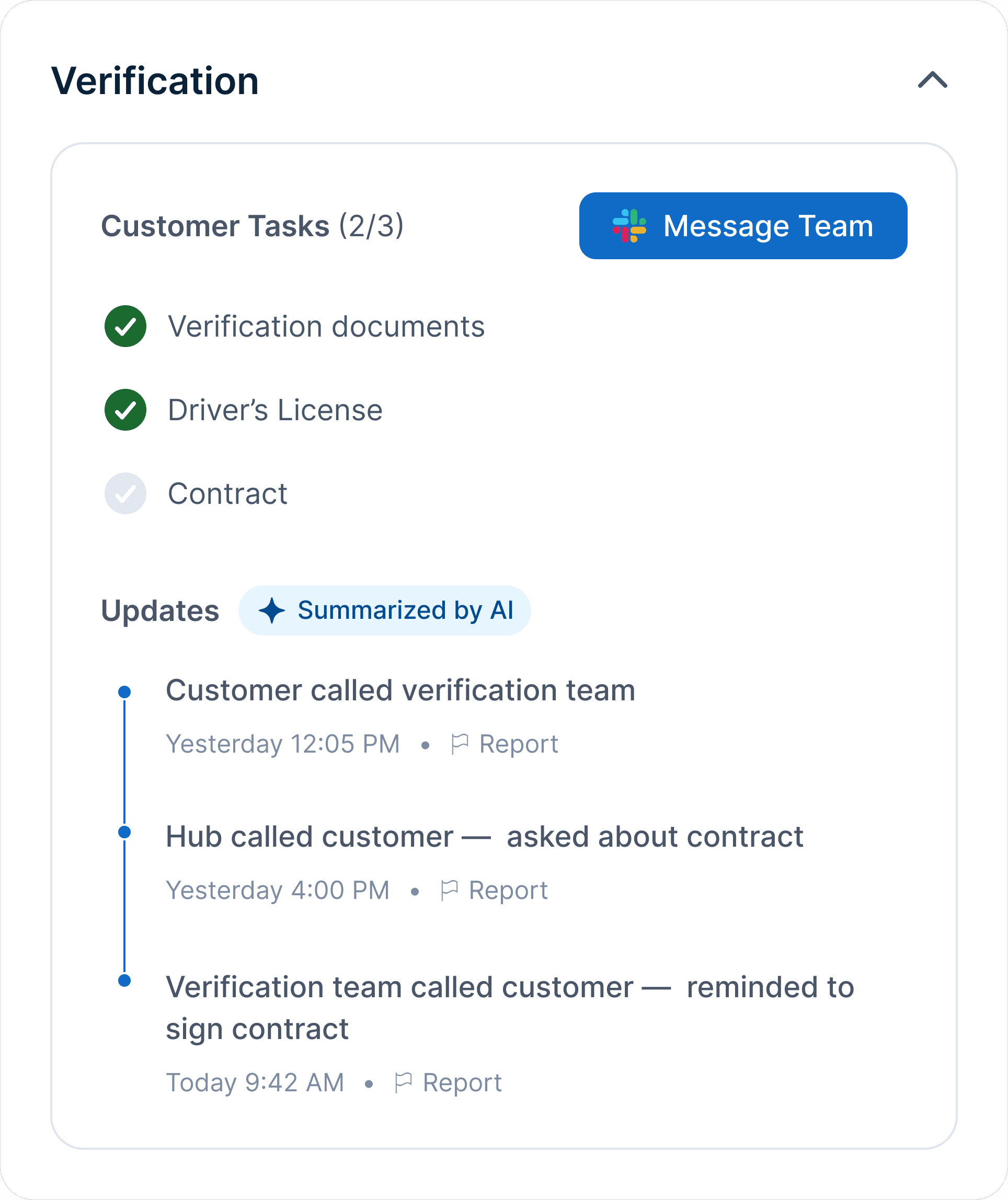
Verification history was siloed in another tool. Now leaders can see what's been discussed at a glance and reach the team in one tap, with a preset Slack message ready to send.

Highlight

I pushed and unblocked the AI-summarized notes feature by connecting MOMS engineering with a different team that had built it before.

RESCHEDULE FLOW

Reusing a pattern from other tools

Rescheduling used to require a Jira ticket to another team. Now leaders can do it directly from the panel, with full context.

Highlight

I used an existing pattern from another internal tool, keeping the interaction consistent with what leaders already know.

Final designs

A side panel that brings the information and actions leaders need to resolve at-risk activities into one place.

SIDE PANEL

Built around how leaders investigate and act

The side panel is organized into three sections in the order a leader would naturally work through them. Tasks appear on every activity. Verification and Repair appear only when needed.

Highlight

During the exploration phase, I ran multiple review sessions with leaders, the operations team, and the PM throughout the design process to make sure the direction stayed feasible and actually solved what they needed.

TASKS

Direct control over task assignment and progress

Leaders can see task assignments and progress, route unassigned tasks to an available LA, or complete pre-work on a late CA's behalf.

Highlight

Engineering flagged real-time saves as too heavy a lift, but I pushed for a lightweight solution since leaders couldn't afford an extra click per save.

VERIFICATION

Verification notes, surfaced in context

Verification history was siloed in another tool. Now leaders can see what's been discussed at a glance and reach the team in one tap, with a preset Slack message ready to send.

Highlight

I pushed and unblocked the AI-summarized notes feature by connecting MOMS engineering with a different team that had built it before.

RESCHEDULE FLOW

Reusing a pattern from other tools

Rescheduling used to require a Jira ticket to another team. Now leaders can do it directly from the panel, with full context.

Highlight

I used an existing pattern from another internal tool, keeping the interaction consistent with what leaders already know.

DESIGN SYSTEM

DESIGN SYSTEM

From one-off design to a shared local pattern

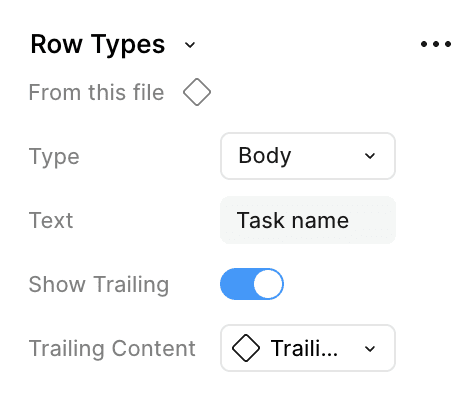
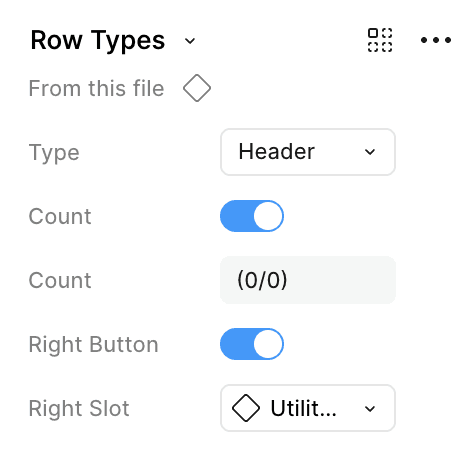
When I built the task list component for MOMS, I realized I had seen the same pattern used across other logistics tools like Cruise Control but built inconsistently each time with no shared standard.

I audited the logistics tools to see how each one handled it, then worked with the design system team on best practices for contributing to a local library. I built the component using global design system variables with configurable slots for different states and use cases, and wrote usage guidelines to go with it. It now lives in the logistics local library as a shared pattern any internal tool can use going forward.
Header name

Header name

(0/0)

(0/0)

Assign

Assign

Task name

Task name

Advocate name

Advocate name

Task name

Task name

Advocate name

Advocate name

Task name

Task name

Advocate name

Advocate name

Task name

Task name

Advocate name

Advocate name

Task name

Task name

Advocate name

Advocate name

Task name

Task name

Advocate name

Advocate name

Task name

Task name

Advocate name

Advocate name

Task name

Task name

Advocate name

Advocate name

Task name

Task name

Advocate name

Advocate name

Task name

Task name

Advocate name

Advocate name

TESTING

TESTING

Tested, validated, and scoped

I tested the designs with three site leaders across experience levels: newer, mid-level, and experienced. Each session covered the same tasks: triaging at-risk activities, using the side panel to investigate and act, completing assign and mark-complete flows, contacting the verification team, and rescheduling an activity.

Their feedback sharpened my understanding of their workflow. Not everything shipped in v1. Some was saved for future phases due to complexity or edge cases.

Verification

Verification

Last updated 14 minutes ago

Last updated 14 minutes ago

Customer Tasks (2/3)

Customer Tasks (2/3)

Message Team

Message Team

Verification documents

Verification documents

Driver’s License

Driver’s License

Contract

Contract

Updates

Updates

Summarized by AI

Summarized by AI

Yesterday 12:05 PM

Yesterday 12:05 PM

Customer asked about verification documents

Customer asked about verification documents

Yesterday 4:00 PM

Yesterday 4:00 PM

Hub called customer to sign contract

Hub called customer to sign contract

Today 9:42 AM

Today 9:42 AM

Verification team called customer to sign contract

Verification team called customer to sign contract

Revision 1

Revision 1

Timestamp on AI summary

Timestamp on AI summary

Leaders wanted to see when verification information was last updated so they could act with more confidence

Leaders wanted to see when verification information was last updated so they could act with more confidence

Reschedule Appointment

Reschedule Appointment

Contact customer to confirm appointment

Contact customer to confirm appointment

Confirm the new time with the customer before rescheduling. (626) 555-0142

Confirm the new time with the customer before rescheduling. (626) 555-0142

Date

Date

16

16

Thu

Thu

17

17

Fri

Fri

18

18

Sat

Sat

19

19

Sun

Sun

20

20

Mon

Mon

21

21

Tue

Tue

Time

Time

8:00 AM - 11:00 AM

8:00 AM - 11:00 AM

11:00 AM - 2:00 PM

11:00 AM - 2:00 PM

2:00 PM - 5:00 PM

2:00 PM - 5:00 PM

5:00 PM - 8:00 PM

5:00 PM - 8:00 PM

Revision 2

Revision 2

Customer contact reminder

Customer contact reminder

Newer leaders sometimes selected a new appointment time before messaging the customer. An inline reminder will help catch the gap before rescheduling

Newer leaders sometimes selected a new appointment time before messaging the customer. An inline reminder will help catch the gap before rescheduling

SHIPPED REVISIONS

SHIPPED REVISIONS

Notes to track activity progress

Notes to track activity progress

A heavier tech lift that we scoped to a later phase to keep v1 focused

A heavier tech lift that we scoped to a later phase to keep v1 focused

Keyboard nav between activities

Keyboard nav between activities

A power-user win, not a workflow blocker

A power-user win, not a workflow blocker

Cross-leader activity visibility

Cross-leader activity visibility

The coordination question behind it needed more research first

The coordination question behind it needed more research first

FEEDBACK SAVED FOR LATER

FEEDBACK SAVED FOR LATER

IMPACT

IMPACT

Early results showed real impact

The team rolled out the new designs to 3 hubs for 6 weeks before expanding to the rest. So far the data was promising.

Resolution time dropped from ~30 minutes to about 21 minutes, and open at-risk activities fell from the average of 35 to 7. We expected some activities to stay open since advocates weren't marking completed calls as done, an issue we plan to address in a future project.

Tool switching also dropped. Leaders stayed in MOMS for most of the workflow instead of jumping between CARMA, Car Tower, and Jira. Steps to resolve an activity went from 4-5 down to mostly two tools. Time in the side panel increased, which was a good sign. The panel keeps leaders focused on one activity at a time rather than scanning the full table.

30 21 minutes

30 21 minutes

Avg time to resolve an at-risk activity

Avg time to resolve an at-risk activity

35 7 activities

35 7 activities

Avg open at-risk activities

Avg open at-risk activities

5 2 tools

5 2 tools

Tools used for resolution

Tools used for resolution